This post is about using LiteLLM so that you can have more freedom and flexibility in the LLMs you use day-to-day. But let’s start by covering the “why bother”.
You might say “just use good steel”
There’s a joke that circulates the internet about Japanese sword making vs western sword making. It goes that, back in the day, Japanese sword makers developed elaborate folding techniques to turn poor quality steel into beautiful blades with unbelievable cutting power. You may have seen the movies where the perfectly made sword cuts through its opponents’ weapons easily.
People in the west, the joke goes on, just used good steel.
Historical inaccuracies aside, a person could argue this is basically where we are with LLMs right now.
You could spend a bunch of time learning how to combine various grades of model to maximise their combined performance for minimum cost. It is possible that someone with unlimited credits on a frontier model may still be able to cut you in half.
The thing is – most of us don’t have unlimited credits for frontier models. We don’t have the “good steel”, we are just renting it at a price we don’t set.
So it’s hard to imagine that any of us will regret having a better understanding of our options.
This post is for you if…

All of that said, I have no real interest in demonising the well-known companies who are producing truly impressive mainstream tools. Things like Claude Code and Codex are great.
I have some examples of the “why now” for this post linked below, but we all know that everything is moving too fast for individual news stories to stay relevant for long. And that’s kind of my point – why would we assume the tools we have now will remain the ones we want to use forever?
This post isn’t designed to turn your worldview upside down. It’s meant to highlight some options to consider if you’ve been thinking that you want some more LLM independence. So instead of telling you why you simply must pay attention, here’s an option to self-select. I think you would find this post valuable if any of the below apply to you:
Read more: LiteLLM – increase your options with LLM tools- Cost consciousness
- You have heard about impressive new models which perform better than we would have dreamed a year ago, while being 50x cheaper than the mainstream options.
- You are trying to limit (or reduce) your ever-growing AI agent bill
- In a similar vein: You are sick of hitting token limits but don’t want to start paying hundreds a month
- You want a way to monitor and set your own spend controls flexibly across multiple services at once (to the extent of setting refresh limits at day or month level, globally, for groups or agents, or individual callers)
- You want to give some tools lots of headroom (i.e. trusted systems, doing important work, that should be spending money to get it right) but you also want to try new things without them spending all your money/ derailing the important stuff
- You have heard stories about cloud providers generating huge bills through lack of hard cost controls, or even just not firing alerts on LLM costs and you want another layer of protection.
- Provider safety
- You have read articles about organisational risks of tying your development stack and products to external APIs, and the benefits of being able to fall back to other providers.
- You want options in case the big providers decide to remove key features from the plans you subscribe to (or in case they decide to remove your favourite model altogether)
- Quality
- You have seen that it requires impressively detailed analysis to prove that mainstream models have got worse and you want some ongoing quality guarantees
- You want to combine models from different providers to make the most of their strengths
- You want to save the most powerful models for the most complex stuff so you want smaller, simpler models to do smaller tasks more quickly and cheaply
- You want to be able to switch out the models you’re using on-the-fly without having to push any new code to your repos (maybe you’re using something like OpenClaw and want to be able to switch quickly)
- Learning speed
- You have listened to talks from companies like Anthropic which emphasise how important it is for you to be able to learn and iterate quickly
- You don’t even have alternative models in mind but you want to be able to experiment/ learn about the landscape first-hand, perhaps to differentiate your skillset from the legions already working with mainstream models
- Security and Observability
- You want a layer of separation between some of your API keys and repos where you’ll be installing new libraries, given the increase in supply chain attacks focused on stealing keys
- You don’t like LLMs having direct access to your API keys because no matter how many times you say “pretty please don’t commit this” they might still do it
- You want to start logging API health or even input and output messages.
It doesn’t matter if only some of those bullet points apply to you, but they all apply to me. Essentially, I want to keep using the best-in-class tools out there, but I want the freedom to decide what tools are doing different chunks of work. I also want to be able to do that with confidence that my experiments won’t run out of control.
I am willing to invest a bit of time into this regardless of whether it reduces my costs, reduces my risk of relying on a few suppliers, lets me systematically choose the right model for the task, or just helps me understand what’s out there.
I don’t care about the pitch, give me the how-to
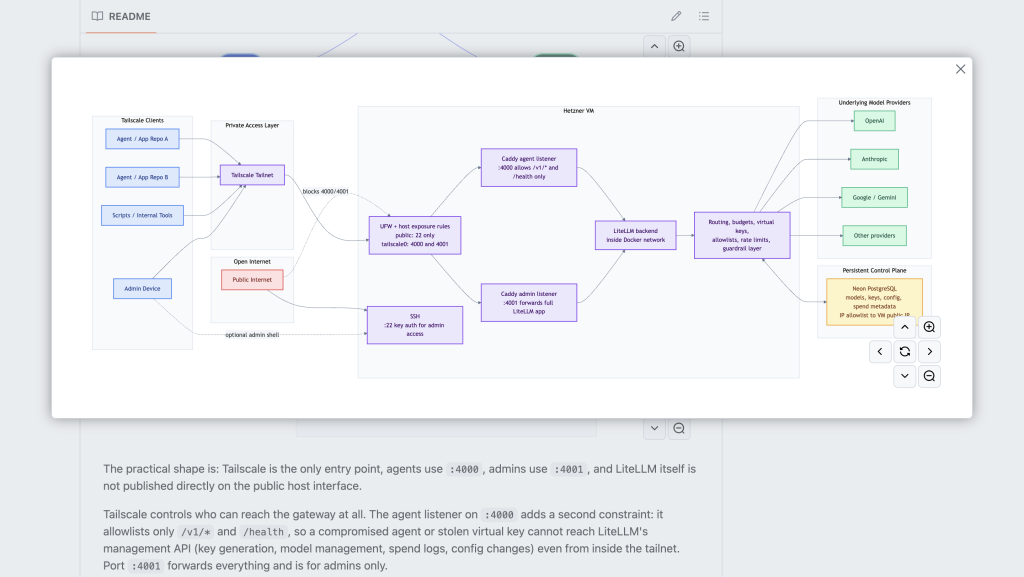
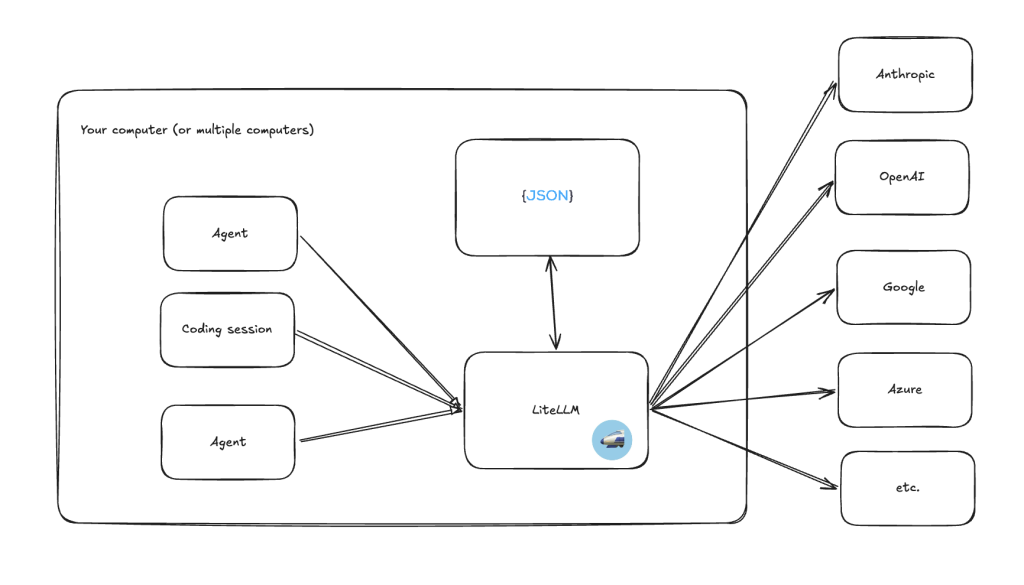
The repo will explain how to get set up with your own LLM routing layer, on a private server. It is step-by-step and doesn’t require loads of deep technical knowledge. It also has visual explainers like the below, but it won’t go into detail of what LiteLLM does and why it’s useful the way this post will.
So what’s the pitch?
There are many steps to achieving a truly flexible cross-platform meld (I’ll be writing follow up posts). This is not about spending days tearing your coding setup apart or rebuilding existing tools. It’s also not just about how to switch between different mainstream models based on the task (though that is a very useful policy if you aren’t doing it already).
This is about the best first step towards getting more flexibility and independence in your agentic use, by putting together your own, consistent, way to access a huge range of model providers.
We can even keep using Claude Code, Codex etc as our main driver, but instruct them to use other models to do lower risk activities like writing commit messages or small blocks of code. This kind of routing can help us improve quality or speed of outputs, reduce cost, and ease the pressure on those pesky token limit windows. And we get to learn what works.
There are paid services like OpenRouter which offer a single point of access to a catalogue of 300+ models, for a fee. The post about using a service like that would be short: go and put in your card details and follow their instructions.
Instead, in this post we’re going to talk about LiteLLM because it is:
- Free and open source
- Great for cost visibility and limits
- Able to route requests to different models dynamically
- Able to connect to a huge number of back-end providers directly so you don’t have to rely as much on the hope that they support the model you want.
To be clear – I don’t work for LiteLLM and I’ll get nothing from them for this post. I just think it’s kind of great.
Basically, if you want to use a service like OpenRouter, you can still plug it in to LiteLLM as a provider, meaning you can benefit from the OpenRouter options PLUS all of the other providers and controls LiteLLM gives you access to.
How does LiteLLM help?
In case you’re struggling to picture what happens here – LiteLLM is a routing layer you connect to multiple providers.
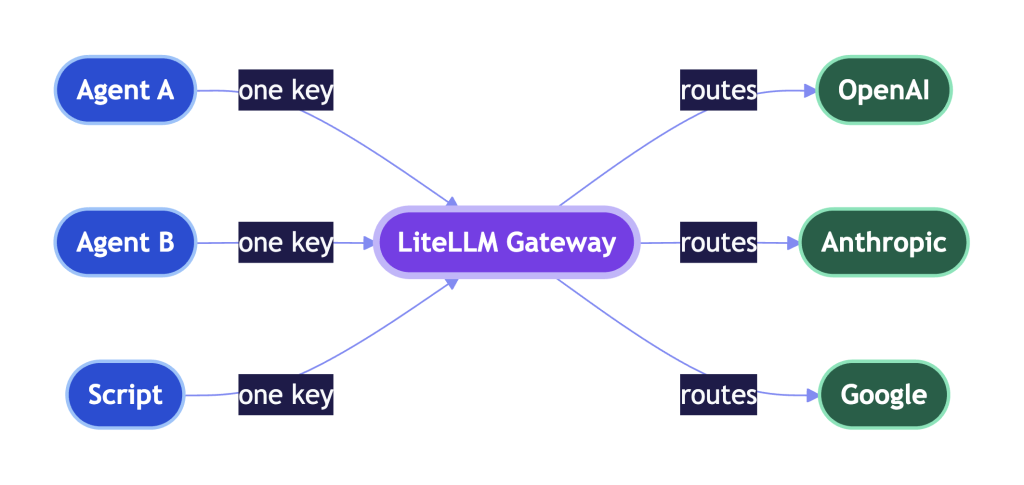
Basically you:
- Sign up for whatever LLM services you choose and get the API keys.
- Set up LiteLLM (you can do it locally but I have put together instructions here so you can have your own server)
- Log in to the admin layer
- Fill in some forms with the details of the LLM API you want to use and give it a name (all saved in your private instance)
- Generate a “virtual API key” to be used by whichever service you want (i.e. a coding agent, agentic assistant, a colleague, whatever)
- Use that API key and URL just like any normal LLM API
- Watch as these services make requests to your private LiteLLM service, get responses returned to them from whatever provider you choose, and operate with the logging and limits that you have set.
Any service that would have been calling a provider directly (Anthropic, OpenAI, Google, Azure, OpenRouter, MiniMax etc. etc.) no longer go to those urls. They will instead call your LiteLLM URL with virtual API keys you have created, LiteLLM will pass the request on. That means you can control a bunch of things you might want to, and other things you don’t want to worry about are handled for you.
Things that you control
What models are used for different work

A host of agents vibe coding your next project
You can pick how deep you want to go on this. At the light end you basically just add the models you want to experiment with to LiteLLM, generate a virtual API key and give that to Claude Code, or Codex, or whoever you want along with instructions like “whenever you are writing commits, use this model”.
If you’re using the orchestrator/implementer split that many of us fall into, you can easily keep your main model (Opus or whatever) as orchestrator, and have it call different models for code writing, code review, test writing, documentation, and commit messages. Or just an expensive one to plan and a cheap one to do. Experimenting is as simple as editing those local text files where your instructions are saved.
It’s not fancy and sometimes your main tool of choice might ignore your rules, but it’s super quick and easy to test, particularly because you can watch your LiteLLM dashboard to see whether your new model of choice is actually getting use. Because LiteLLM ensures standard input and output regardless of what model you’re ultimately calling, it means that when you tell a model to use LiteLLM for something, it is less likely to screw up the request.
If you want to push things a bit further, you can use LiteLLM routers. Instead of telling your model “pretty please use endpoint a for easy work and endpoint b for hard work” you can use a LiteLLM to automatically route between models of your choice. You fill out another simple form which can switch between models based on complexity, or even type of task if you want to get fancy with it.
One thing I like to do is create a router even if all of the options are just one model. I name the router after the job I want done rather than the model that is doing it. Then if/when I want to start experimenting with a different model, I can change some of those fields and see what I think of the results. This does mean that it’s hard to look at a repo and know exactly what model was used, but it is fantastic for centralisation and clear intent across your projects.
Of course, if you want to push it to the max, you could develop your own multi-step pipeline where, instead of relying on convincing your orchestrator model to call other endpoints, you take matters into your own hands and directly give small, specific, step-by-step tasks to different models. LiteLLM can help you there too, again through standardisation and budget control, but you don’t have to go that far.
Cost
It’s understandable to be concerned about runaway spend. The issue is that, not only are you trying out new APIs with their own respective costs, when you start using a new model, you don’t know how effective or eager that model will be. Will it start work, hit one bump because of a typo, and generate tens of thousands of requests trying to recreate Node? Hopefully not, but there’s no reason for us to take that chance.
With most of these services, you’re able to just preload a certain amount of money and turn off auto-top up. So you have one layer of control for the actual LLMs you’re calling. But what if you want the flexibility to use multiple services, without being surprised by suddenly having to top up everything within a few days?
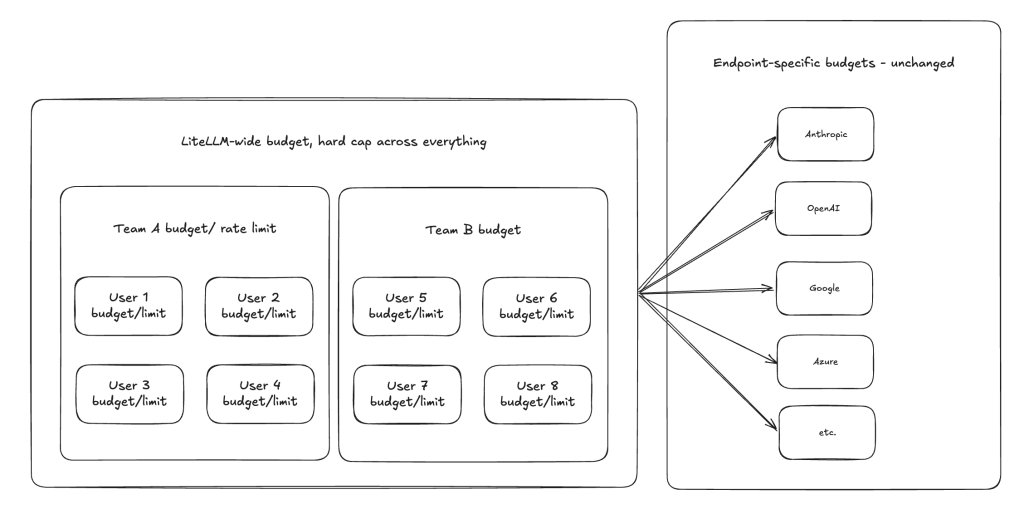
With LiteLLM we can set an overall budget cap, which refreshes on a daily or monthly basis. When we are setting up we will also create teams, users, and virtual keys. You don’t have to set budgets for these levels, but you can set daily or monthly refreshing budgets at any level of granularity and they will cascade down.
That means that, if you have a group that you trust well and you want them to be able to really open up the throttle and run, you can set a generous budget for them. At the same time, you can have another collection that you might trust less, you can set stricter budgets (maybe you lock down the whole team, or just individual users). This works just as well for running local agents as it does for running teams of humans – in either case, the ability to set budgets to almost any granularity means you have more control over what you’re spending across multiple services. That control gives confidence, that confidence means we can move faster.
(Costs aren’t perfect)
One thing to bear in mind – the costs are estimates based on known input/output token rates, so there is going to be a bit of variability on when exactly the cost ceiling kicks in. For most people that should be enough – it’s rare to need such specific cost control that a small margin of error is an issue, but this is still worth bearing in mind.
Most of the costs of different models are auto-loaded with the option to schedule an update to check for price changes, in some cases you’ll need to manually enter the cost yourself. When you add the model, make sure there are costs added in, or the cost tracking and budgets won’t work for that model (LiteLLM will act as though it is free).
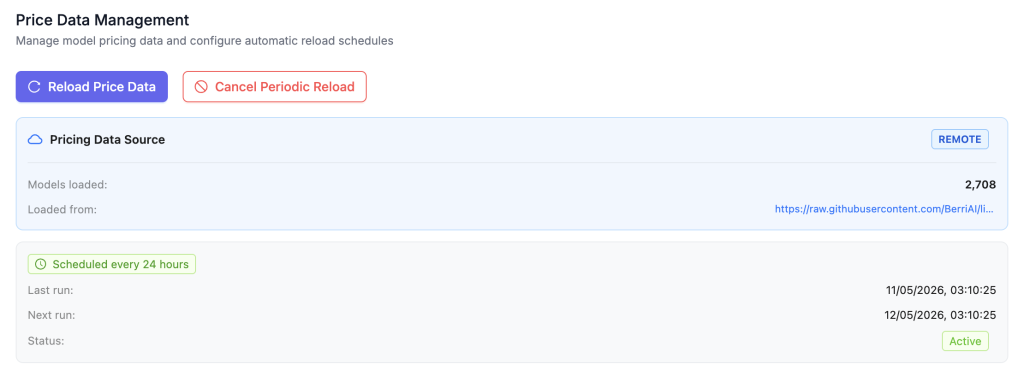
What models or MCPs different agents have access to
Just as you can change what budgets are applied to different teams or keys, you can change which models are accessible to different teams or keys.
This is particularly useful if you have more expensive models that you want to save for just the most important work, or if you have experimental models that you want to run limited tests on.
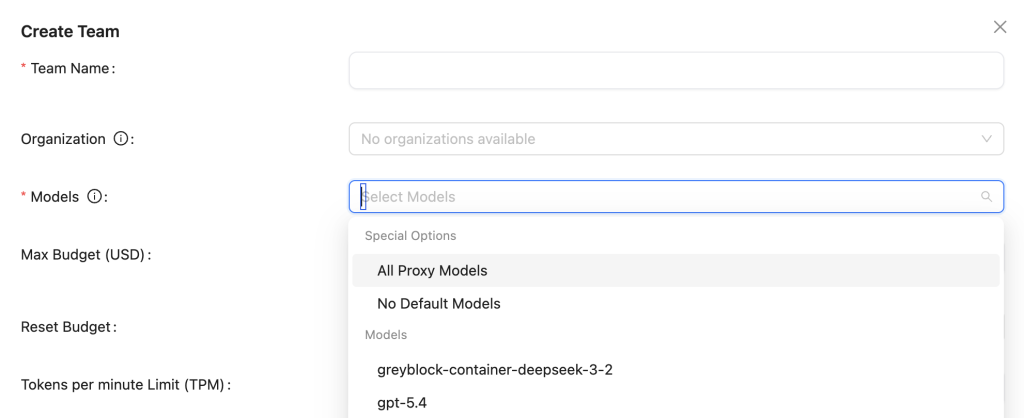
You can also set up variable access to MCP servers, routed via LiteLLM.

Security posture

Apparently this is what you get when you ask for a picture of a well guarded key.
There are a couple of layers to this. The first and most obvious is that if you use LiteLLM with a database all of your API keys are in one place, and any key you use elsewhere is a virtual key with centralised control and auditability.
You can set daily hard caps on spend, and if a rogue agent, or a person, gets access to that key, it’s easier to spot it and cut them off.
But that’s just scratching the surface of the security posture here.
First – your API keys stored in the Neon database are encrypted at rest, meaning if someone somehow gets access to that database, they can’t use the keys without your salt.
The database is also set up to only accept connections from your Hetzner service, so a person shouldn’t be able to access the database anyway.
Any agent who wants to use a virtual API key will only be allowed to make requests if they are already on your Tailscale virtual network. So even if your virtual keys leak, no one will be able to use them unless they also have access to your VPN and the exact URL of your server.
The url which agents are given will allow them to use those virtual keys for LLM requests but any attempt to access admin routes will be blocked server-side to avoid risk of them editing settings or key information leaking to them in another way.
Any attempt to access LiteLLM admin will also require a person to be on your Tailscale network, using a specific port or it will be blocked. There is also a separate username and password check before allowing access.
The only way external internet traffic can access your server is by either:
- Getting access to your Hetzner account
- Knowing your server URL and having your private key to access it (you can also lock this down to your VPN but it could make recovery difficult if something goes wrong).
So, you have complete separation of your actual service API keys from everything else and several layers of protection against illegitimate access. None of these things are ever bullet proof, but this is heaps safer than copying the keys from place to place, or generating new ones and losing track of what the old keys are propping up.
Make sure you keep your Hetzner account secure, your server URL a secret, and your private key locked up tight, and you should be set.
Hosting
The instructions I’ve shared assume you’ll be hosting on your own server with a dedicated database (don’t worry, the instructions should take you through the full setup).
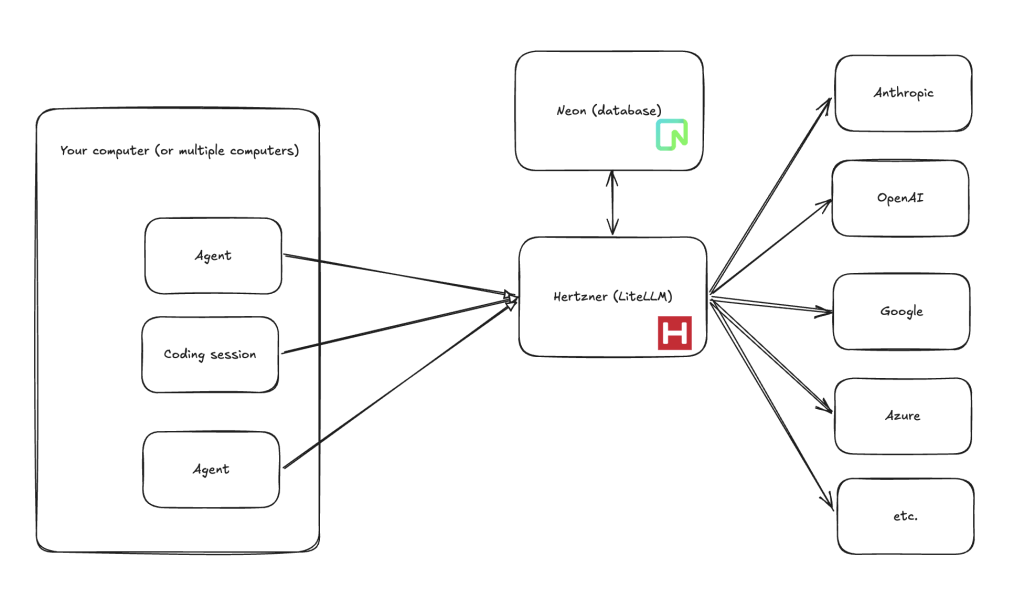
But you don’t have to do it that way around, you can run it locally on your laptop as a local proxy. Doing everything locally can reduce your external surface area (it becomes much harder for someone to access LiteLLM) but it also reduces your separation between agents and your API keys/credentials because they are no longer on totally separate machines. It’s also more demanding for your local machine, which could cause bottlenecks because agents tend to make bursts of requests.
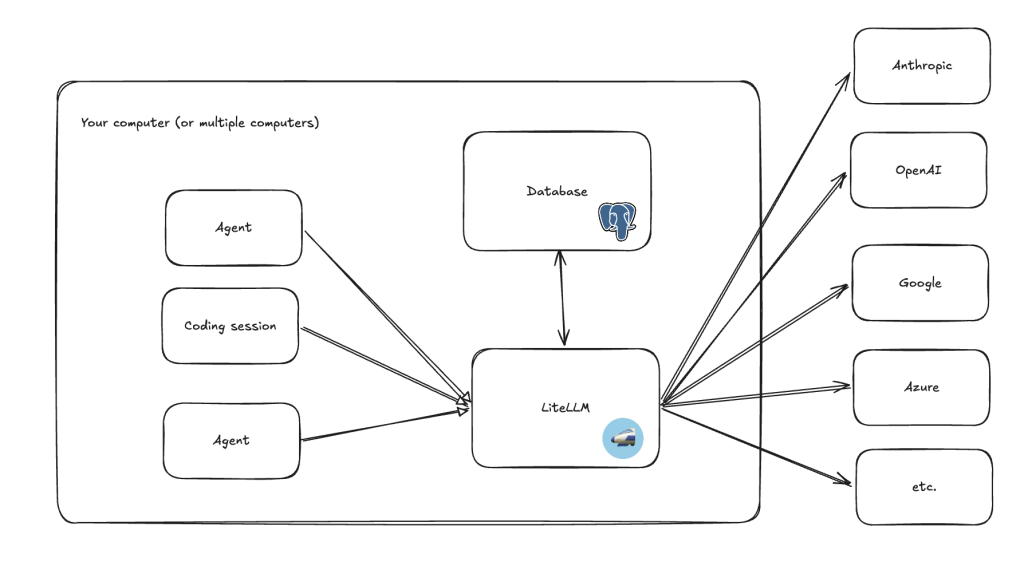
You can even ditch the database and interface entirely, and write everything yourself locally in JSON files. That way you don’t have the overhead of the database and the UI, you also don’t do things like logging and cost tracking which can be intensive. Though at that point you’re just using LiteLLM as a standardised gateway. It’s still good for things like making error messages consistent, but you lose out on the no-code flexibility, logging, and budget control which tick so many of our boxes.
Prompts (experimental)
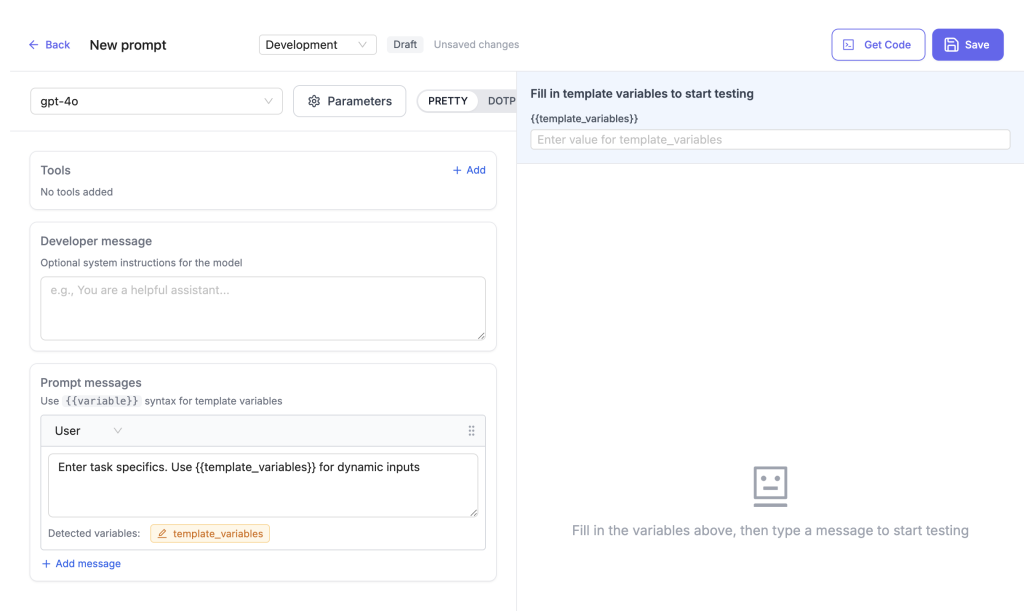
LiteLLM has a prompt injection function which lets you set prompts to refer to later. In my opinion – the fragmentation of prompt templates is an issue that needs a centralised solution. I’m not 100% sure this is the way forward, given that it is adding another layer to the prompt stack, which could make existing version control issues more pronounced. But if you can commit to this, it is at the very least an easy way to write prompt templates in one location and have them immediately usable across every system you route through LiteLLM.
Things that are handled for you
Standardised model errors/responses

There’s a series of things that most LLM endpoints need to be able to do. I.e. they need to be able to receive a request, respond (ideally stream that response so you don’t have to wait for everything to be sent at the end), or return errors like “the endpoint is down” or “you have run out of tokens for this window”.
The problem is that often they do it in slightly different ways. The url is different, the format of the request, the specific way in which they say “no more fanfiction for you – you have used all of your credits in this window”. Having to manage all of that increases the overhead of switching between models, and of working with multiple models.
We want things to be as easy as possible, so we can use as many options as possible. That way we learn, we save money, we get better results.
LiteLLM standardises everything so we don’t have to worry about variability between providers. All of the major options are there for every endpoint but we don’t have to remember the specific way they want us to say pretty please. That makes it easier for us and consistency also means that if we are asking LLMs to make requests via LiteLLM they are more likely to get it right the first time, rather than having to make repeated calls, or giving up and just doing the work themselves.
Model registration and secure key storage
While you’re in control of things like your database setup and hosting (the instructions will walk you through) the process of selecting a model, as well as encrypting, saving, and retrieving your API keys are all handled for you by LiteLLM.
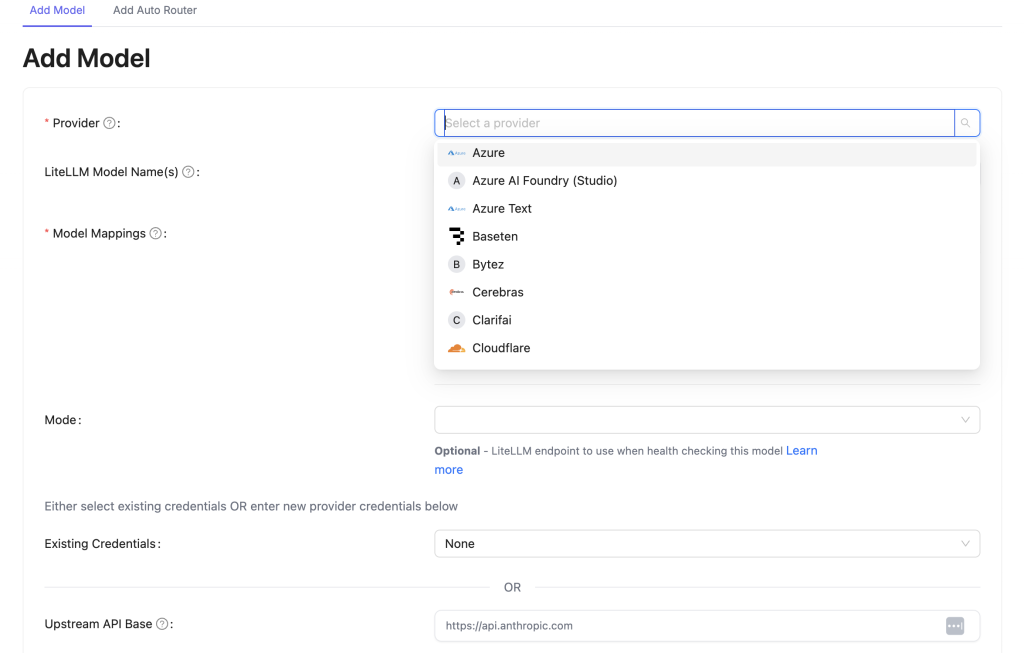
Pretty much any provider you can imagine is listed, it’s usually easy to select the model you want and put in the access information, you can reuse provider credentials across models if you like, and once you’ve filled everything out you can “test connect” before saving and the interface will tell you if everything is working as expected.
Fallback Routing and Load Balancing
We’ve already mentioned above the ability to set up your own variable routing. Even if you don’t always want to change what model you use, there could be a lot of situations where you want to make sure that an individual provider outage doesn’t mean everyone is totally cut off.
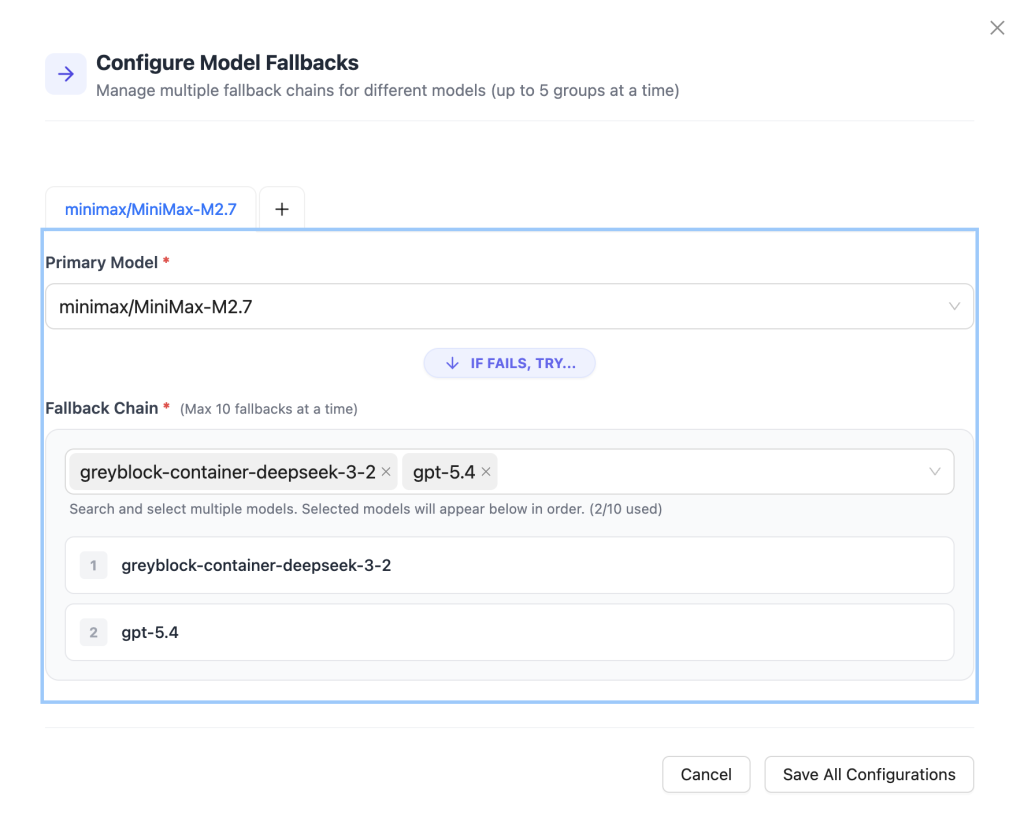
In LiteLLM you can configure global fallbacks (under settings) or again you can override fallback behaviour at team or key level. If LiteLLM tries to route a request to a specific endpoint and it fails, it will step back through your alternatives in order until it finds one that works. The person (or agent) who is trying to use the LLM doesn’t even need to know that anything changed.
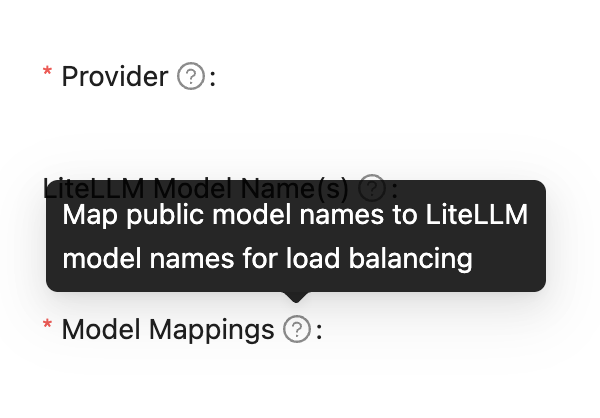
Likewise, by adding multiple models, mapped to a name you choose within LiteLLM, you can add automated load balancing between those models.
Logging (usage and cost)
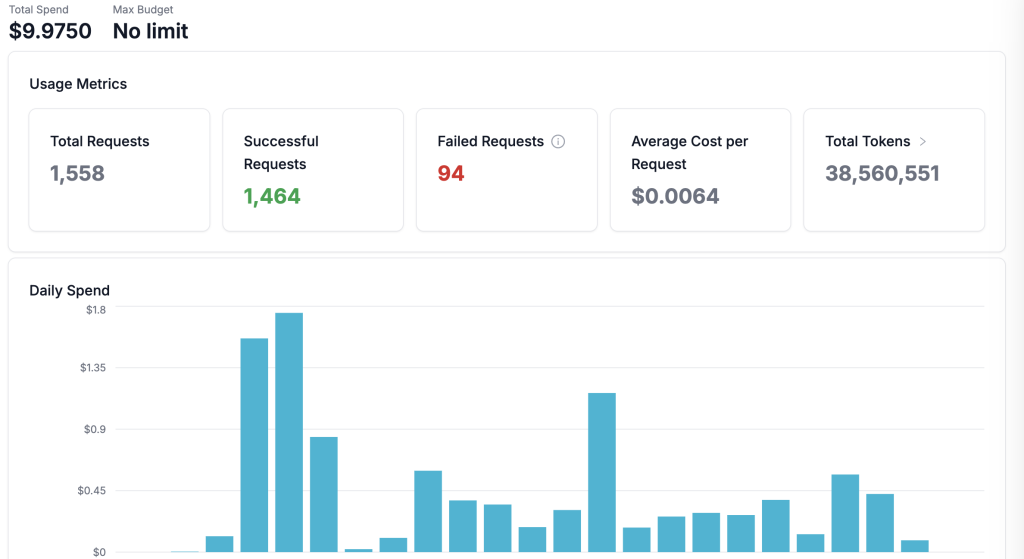
And of course then there’s the data – you’re able to track usage by user and team, by model and provider. You get easy rollup metrics for spend, requests, cost and tokens and it’s all updated in real-time.
You can also dig into individual requests, even the simplest version has more information than can fit on a screen and you can choose to log the complete input and output text if you want to start building a consolidated history which you can dig into later (though of course you’ll need enough space to store it all).

Why don’t we just do it locally?
You may be thinking that you’d rather skip the server and database setup and run LiteLLM locally. That is entirely possible, but there are different sacrifices depending on how you do it.
Running it on the same machine
Let’s imagine you are doing everything (coding, running agents etc.) on one machine already. You could run LiteLLM and the database on that same machine. That would mean that:
- You no longer have total separation between your API keys and everything else. Even though they will be encrypted at rest, the key needed to access them will also exist on the same machine
- You will have to do a bit more setup (particularly if you want to add more security for API keys)
- Additional steps when you start work (you’ll need to make sure the server it’s running)
- You can’t rely on it for applications on other machines (sure you can use a VPN but as soon as your main machine powers down or loses Internet connection, everything else can be cut off).
- You’ll need to use some of your computing resources to handle the LiteLLM routing and logging. Given the tendency of agents to send bursts of requests, you may need more headroom than you think to run LiteLLM for “just you”. LiteLLM recommend anything from 4 CPU and 8GB RAM.
Running on a stand-alone machine
If you have the capital to invest in a stand-alone machine, you sidestep a bunch of the issues related to squeezing everything into one machine. Assuming you have a decent stable internet connection you can still have “always on” applications going by this route, though you may find some slowdowns.
You’ll also preserve the benefit of having your API keys stored separately to everything that wants to use them. There’s a slight compromise that your encrypted keys and the salt to decrypt them are now in the same place, though you get the benefit of being able to lock down that individual machine more thoroughly.
The biggest drawback here is the need to buy a machine and run it. It could be a long time before the upfront investment breaks even, particularly if we’re talking about around $15 a month on server costs. If you already have a spare computer to hand, or you’re buying a rig to run local LLMs as another endpoint (also possible to serve via LiteLLM) this could be a good choice.
The Drawbacks
Of course, with any architectural decision we need to consider what we are sacrificing. We’ve already spoken about the tradeoffs of running this locally above, but let’s look at the project overall – it would be disingenuous for me to act as though this will be right for absolutely everyone.
Setup time and complexity
The most obvious drawback is that this takes some setup. Even though a lot of it is pretty streamlined, this takes more work than just opening your coding agent of choice and bashing away.
Adding something into your stack also means some maintenance. Ideally it’s a pretty small time investment, but it’s not 0. A person may reasonably decide that the benefits here aren’t worth the time investment.
Additional network hop and latency
Instead of going straight to the server of choice, your LLM requests will have to go to your LiteLLM server, ask it to make the request and then wait for the response. Extra steps means extra wait time. Though to be honest, the request delay is very far from the biggest deciding factor in wait times when using an LLM – a far more significant driver of delay is how fast the model is itself. Speaking purely anecdotally I have noticed no real difference in speed when using the same model, and often an improvement in speed where this means I’m able to use lighter, faster models for the same job.
Ongoing costs
While this can help you save on direct LLM costs, you will need to pay for a small server and database if you don’t choose to host things locally. I’ve seen this done for about $15 a month, you may find better or worse deals.
In a similar vein to the complexity and maintenance points above, if you start to scale up your LLM use, this proxy layer will be another thing that you might need to scale to avoid bottlenecks. Though the specs of the server and database in the instructions should include a bit of headroom so that most people aren’t immediately faced with the need to scale.
Having to set up other accounts to access LLMs
This one is pretty hard to get around – if you want to access other services you’ll need to set up accounts and payment to do so. You could just use OpenRouter – part of the idea there is you pay one fee to access multiple endpoints. That doesn’t mean they have everything but it might cover enough for your usecase. Personally I have found that Microsoft’s Azure Foundry is impressively easy to set up and offers access to loads of models, including mainstream ones as well as pretty much anything hosted on Huggingface. Their prices are often very competitive.
If your aim here is to try out more unusual models so that you build a broader understanding of what’s possible, you will probably find you can’t get around creating accounts you wouldn’t otherwise need.
Storing all your keys in one place
While the database setup here should offer a bunch of protection from accidental API key leaks (to humans or bots) the fact remains that you are saving all your API keys in the same place.
I guess this is kind of similar to the question of whether to use a password vault or not. Do we put everything in the same place and make sure it’s secure? Or do we prefer to limit blast radius by storing our keys in different places.
Personally I prefer the “single secure location” approach but if you don’t, or if you feel the benefits here aren’t worth abandoning your current keychain, this might not be the best fit for you.
Running LiteLLM locally with a keychain or secure vault could get you the best of both worlds (and no recurring hosting fees) but it’ll take more setup and will take up some of the resources on your machine.
Having to use API keys
Many of the mainstream coding plans offer the option to pay a flat fee rather than having to pay per request. As well as making sure you don’t end up with unexpected charges, the cost-per-token rate tends to be better. Unfortunately if you want an API key (which LiteLLM requires) that means:
- Having to generate a key you then need to protect
- Not always having predictable monthly spend
- Potentially worse per-token charges.
To begin with, my suggestion is: don’t cancel the coding membership (maybe reduce it if you can) continue to use that as your main driver and ask it to use other models from different providers for specific tasks. You’re still having to generate API keys for those other models, but the idea is you start to take some work away from the expensive service and hand it to the cheaper services. The fact that you don’t pay a monthly fee for all of these other endpoints can be a benefit – a low work month means lower costs that can offset busier periods.
LiteLLM standardises API calls not models
If you’re used to using expensive frontier models and switch to a niche, budget option, you can expect differences in output quality.
Likewise, when we purely use a bundled tool like Codex or Claude Code, there is an internal team releasing those tools who are being measured on their ability to create a good developer experience for as many people as possible. When we start introducing other models, we are opting in to some of that effort to getting things working together and frameworks like LiteLLM won’t mean that different models suddenly have the same quality, quirks, or style of writing. “Writing style” in particular can be an issue if you’re relying on a model to produce diff-style code changes, respond with correctly formatted JSON, or refuse to answer if there isn’t enough information.
Fallbacks and routing can silently change output quality
If you decide to set up LiteLLM so that you have automated routing or fallbacks, that can mean that different models respond to requests without the calling user or agent knowing about it. That kind of variability can introduce frustration and make it harder to pin down bugs if you don’t set it up carefully.
Of course in small “team of one” experiments you may be able to handle that by simply bearing your own setup in mind. But if you plan to scale to multiple agents or users, it’s probably worth some deliberate planning on how you’ll minimise the issues here.
Conclusion
This kind of multi-provider setup is not necessarily for everyone. For many individuals or teams – the robustness and simplicity of just choosing a mainstream provider and sticking with them is more than worth the limitations.
That said, for anyone who is interested in going off the beaten track a little bit, I hope this has helped to highlight at least one of the options on the table.
Don’t forget to check out the repo for instructions on how to set up LiteLLM for yourself
Feel free to drop me a line if you’d like to chat about it more.